What Is Email Automation and How Does It Work?
As various technologies and tools rise to prominence and then fade, email's dominance as a marketing channel has remained remarkably consistent. It's not only the preferred means of business communication for most people, but it consistently ranks among the highest-converting marketing channels available to digital marketers.
Email automation allows marketers to schedule targeted messages or send them when a user performs a specific action on a website. It's an effective method for nurturing existing leads, engaging new customers, and regularly reconnecting with past customers — reminding them about a brand and informing them about new deals, promotions, and updates.
While newsletters and one-off campaigns will always have a role in any email-marketing strategy, the most effective approaches involve setting up automatic email campaigns that trigger based on a user's actions. These automated emails are timely, personalized, and highly relevant to the reader, which is why they tend to be opened and clicked more frequently than broadcast messages.
What Is Email Automation?
Email automation is the process of sending emails to one or many recipients at a specified future time or in response to a defined event. Marketers can automate delivery based on a number of conditions: time and day (e.g., 4 p.m. on Monday), actions taken by contacts in their database (e.g., when a contact views a specific web page), or rules defined in workflows (e.g., drip and lead-nurturing campaigns). Automated emails eliminate the manual effort of sending messages to individuals one at a time.
How Does Email Automation Work?
Each email-automation tool operates somewhat differently, but the basic flow follows a consistent pattern:
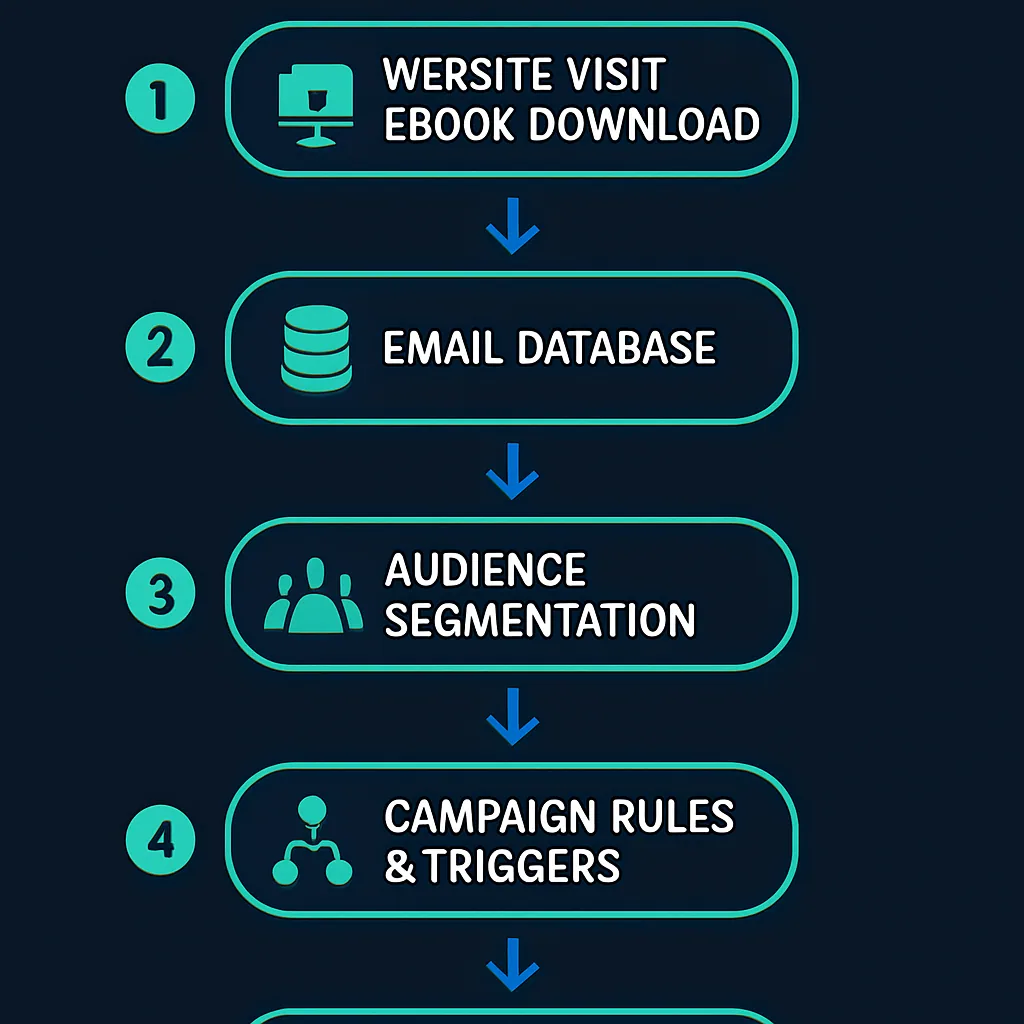
Here's a typical example of how email automation works:
- A person visits a website and downloads an ebook, fills out a form, or takes some other action.
- They are added to the email-marketing database.
- They are placed into audience segments based on their location, interests, behaviour, and other attributes.
- The marketer creates an email campaign, sets the rules and triggers, builds the drip sequence, and schedules the emails.
- The person receives emails based on the conditions and campaigns the marketer has configured.
Email-Automation Best Practices
Email-marketing platforms are powerful tools capable of growing a business regardless of industry. Like any capable tool, though, they come with their own set of dos and don'ts. Today's consumers receive an enormous volume of commercial messages and have little patience for irrelevant ones.
The following are some of the most widely recognized email-automation best practices.
1. Send a confirmation or welcome email
When someone signs up for a newsletter or fills out a contact form, a confirmation or welcome email should follow promptly. The confirmation reassures the contact that their sign-up was received; the welcome email helps foster the newly formed relationship and sets expectations about what they'll receive.
2. Send emails based on time zones and analytics data
Most emails are opened within the first 24 hours of being received. If the goal is to maximize open rates, it's worth examining what time zone contacts are in and what analytics data reveals about optimal send times. Research published by tools like Mailchimp on send-time optimization provides a useful starting point.
3. Segment contacts based on location, behaviour, interests, and more
One of the most reliable ways to improve open rates, click-through rates (CTR), and overall engagement is personalization. The mechanism for achieving it is segmentation — dividing contacts by location, behaviour, interests, purchase history, lifecycle stage (e.g., lead, MQL), and other attributes.
By doing so, specific contacts can be targeted with emails that are genuinely relevant to their situation. For example, sending an email to contacts in Melbourne about an upcoming Melbourne event will outperform sending the same message to the entire database.
4. Quality in, quality out
The effectiveness of any email-automation program depends heavily on the quality of the contacts in the database. Running automation against a clean, engaged list is the most direct way to maintain high open rates, click-through rates, and conversion rates.
Rather than adding any available contact to the database, the established approach is to require a double opt-in — a confirmation step that verifies a contact genuinely wants to receive communications. This prevents junk addresses and disinterested signups from diluting list quality.
For unresponsive contacts, displaying periodic opt-in prompts can help prune disengaged people from the list — similar to what CXL does:
CXL re-engagement opt-in prompt example
This keeps the database a self-cleaning, quality source of leads over time.
5. Don't always go for the sale
Email marketing, like other areas of marketing, does not have to be primarily about selling. Constantly pushing for conversion can come across as intrusive and spammy, which drives unsubscribes and damages sender reputation.
A more effective approach is to ensure each email delivers genuine value to its recipients — educating, informing, or even entertaining them rather than simply asking them to buy. A call-to-action can still be present, but the sale shouldn't be the primary goal of every message.
6. Make it easy for people to unsubscribe
Respecting subscribers' decisions means making the unsubscribe process simple and frictionless. When contacts no longer want to hear from a brand, making them jump through hoops only damages trust and risks spam complaints.
This is also closely tied to list quality: by building a database of contacts who are genuinely interested in the content, the risk of unsubscribes is minimized in the first place.
7. Test, test, and test again
There are many things that can go wrong with automated emails — broken links, broken images, misfired tracking tags. Testing before sending catches these issues early.
Testing also helps refine emails in terms of load time, subject line effectiveness, and content performance. Knowing which links users click provides strategic insight for future campaigns, allowing marketers to fine-tune content length, design, and layout.
Some email-automation tools also include spam testing features. Because even well-crafted emails can be flagged by spam filters, these features automatically run a message against major spam filters, flag problems, and provide actionable recommendations before the email is sent.
8 Popular Use Cases of Email Automation With Examples
Email automation applies to a wide range of marketer objectives. The most common use cases are outlined below.
1. Welcome email
Visitors often arrive at a website without any immediate intention to purchase. Because they've expressed some level of interest, though, they're good candidates for ongoing communication. Subscribing to a newsletter is a low-commitment step toward conversion, and a well-crafted welcome sequence can help move them along the funnel without being overbearing.
Offering incentives — like a discount on a first purchase — can give new subscribers a concrete reason to stay engaged.
Welcome email example with first-purchase discount
2. Transactional email
Transactional emails typically inform users about order and delivery progress, but the name is somewhat misleading. These messages can be triggered by a range of specific actions on a website or mobile app — not only purchases, invoices, and receipts.
Examples of automated transactional emails include password-recovery notifications, shipping progress updates, account activity alerts, and social media notifications.
Amazon order confirmation and shipping notification email example
3. Lead-nurturing and drip campaigns
Research indicates that 96% of website visitors are not yet ready to buy when they first arrive. Because they've shown interest, though, they're strong candidates for ongoing communication through an email list.
Subscribing is a much smaller commitment than making a purchase, which is why conversion rates for list sign-ups tend to be higher than for direct sales. From there, an email-automation tool can run a series of lead-nurturing emails or drip campaigns to keep the brand top of mind.
- Lead-nurturing campaigns are designed to convert leads into customers over a series of automated emails. A typical sequence might start with general, benefit-focused messaging and gradually shift to a more direct sales tone over the course of a few weeks.
- Drip campaigns are often used for non-sales purposes such as customer onboarding. The goal of these emails is not to sell but to get new users actually using the product or service they've signed up for.
CRM systems like Salesforce or Highrise allow marketers to flag specific leads for nurturing. The platform then routes messages to these leads through an integrated email-automation tool such as Zapier.
Key principles for drip campaigns:
- Keep people engaged with the brand over time and help gradually convert them into customers.
- Educate rather than sell.
- Provide something genuinely valuable — email courses are a common and effective approach.
4. Newsletters informing about new content or products
For organizations that publish a blog or release regular content, email automation is a convenient way to notify audiences about new posts, videos, product launches, and other updates. This helps grow an engaged readership and ensures new content reaches the people most likely to interact with it.
According to Neil Patel, email subscribers are significantly more likely to share content on social media than non-subscribers. Newsletters can also be used to curate aggregated lists of useful content from other publishers — Moz does this effectively with its own newsletter.
5. Anniversary and milestone emails with a special offer
Sending emails on a subscriber's birthday (if that data has been provided), on the anniversary of their becoming a customer, or at another notable milestone is a simple but effective way to reward loyalty. Adding an offer — such as 15% off or a fixed-amount discount — gives the recipient a concrete reason to engage.
Anniversary email example with discount offer
6. Product-related emails and updates
Email is an effective channel for keeping audiences informed about product updates, newly launched features, upcoming webinars, and company news. These messages serve to remind customers of the product's value, reinforce its relevance to their needs, and educate them on capabilities they may not be using.
Microsoft product update email example
7. Research and feedback
Automated emails are a practical vehicle for sending customer surveys, product feedback requests, and satisfaction research. Responses help surface customer pain points, unmet needs, and unexpected use cases — insights that can directly inform product development prioritization.
They can also reveal misalignments between what a product delivers and what customers expected — intelligence that may prompt a recalibration of marketing messaging. Short, focused surveys tend to perform best in this context.
8. Product engagement and customer retention
When users haven't engaged with a product since signing up or purchasing, automated emails can highlight features, demonstrate value, and educate the audience on what the product can do. This type of messaging helps increase the perceived value of the product and encourages users to become regular, paying customers — particularly during a trial period.
If a customer hasn't started using the product at all, engagement emails can invite them to get started, offer assistance, and provide additional reasons to use the product. If a user has abandoned their cart before checking out, automated reminder emails are an established way to recover those potential sales.
Customer retention is worth treating as a strategic priority. Losing existing customers is costly, while retention is relatively inexpensive. According to Bain & Co, a 5% increase in customer retention can increase a company's profitability by 75%.
Subscription-based products benefit from automated emails about expiring subscriptions, storage limits approaching, or failed recurring payments. Dropbox, for example, uses this approach to notify users when they're running low on storage space and encourages them to upgrade.
Dropbox storage-limit notification email example
Sending emails before a trial ends — or offering a short grace period before requiring an upgrade — is a widely used and effective retention tactic.
Popular Email-Automation Tools
Logos of popular email automation platforms
Email-automation tools come in a wide range of configurations. While most share a common set of core functionalities, they often differentiate on specific features suited to particular use cases. Competition in this space is strong, and platforms actively work to stand out.
Moosend, for instance, offers weather-based automation — the ability to trigger emails based on the weather at a user's location — which is particularly useful for eCommerce stores selling seasonal products like umbrellas or sunscreen.
Mailtrap is an email delivery platform designed to test, send, and manage an entire email infrastructure in one place.
Email-automation tools can be used independently or integrated with CRMs. Platforms like HubSpot and Marketo include email automation as part of broader marketing-automation suites rather than offering it as a standalone capability.
For a more comprehensive list of leading email-automation solutions, OptinMonster publishes regularly updated comparisons.
Closing Thoughts
Email marketing is a personal and cost-effective way to reach target customers. It works across devices — mobile accounts for 46% of all email opens, followed by webmail at 35% and desktop at 18% — making it one of the few channels that reaches users consistently regardless of platform.
Email-automation has attracted renewed attention as cookie-based targeting becomes increasingly constrained by privacy regulations and browser-level restrictions. Email-based campaigns deliver messages directly into the same inbox as a recipient's personal correspondence — a level of proximity that is hard to replicate in an era of ad-blocking and banner blindness.
When implemented well, email automation lets a brand's messages reach the right person, at the right time, with content relevant to their current situation. That combination of personalization and timeliness is what separates automated email from broadcast communication — and what makes it one of the most durable tools in a marketer's repertoire.