What Is a CRM and How Does It Work?
Maintaining good relationships with customers is the cornerstone of every successful business, but for much of the pre-digital era, managing and tracking those relationships was fragmented and time-consuming. Companies stored customer data in filing cabinets, rolodexes, and spreadsheets — methods that involved enormous manual effort and meant information rarely flowed cleanly between departments like sales and marketing, often leading to missed opportunities.
The rise of the Internet ushered in a wave of marketing-technology (MarTech) platforms designed to solve exactly that problem, and the customer relationship manager (CRM) became one of the defining tools of that shift.
What Is a Customer Relationship Manager (CRM)?
A customer relationship management (CRM) platform is software that companies use to manage interactions with customers, store information about them, and automate processes connected with a customer's journey through the marketing and sales funnels. A CRM system is a foundational tool for fostering customer loyalty and converting that loyalty into revenue.
What Does a CRM Do?
At the most basic level, CRM software allows marketers and salespeople to manage and analyze relationships with both existing and prospective customers. It enables tracking of every interaction a customer has with the company and collects information along the way. When a salesperson speaks with a customer, they can immediately see who that person is and review their full history with the company — making the interaction more personalized, increasing conversion likelihood, and building trust.
CRMs track customer and company interactions across a range of touchpoints, including:
- Contact forms
- Search engines
- Emails
- Phone calls
- Social media
The software also handles certain processes automatically — sending reminders for important events, surfacing alerts when something needs urgent attention, and automating repetitive tasks for marketing teams. Many CRMs include analytics capabilities that allow teams to measure the effectiveness of marketing efforts across lead generation and conversion.
When combined with marketing automation, a CRM gives sales and marketing teams a connected set of tools to manage the entire funnel — from lead qualification through opportunity management, forecasting, and deal closure.
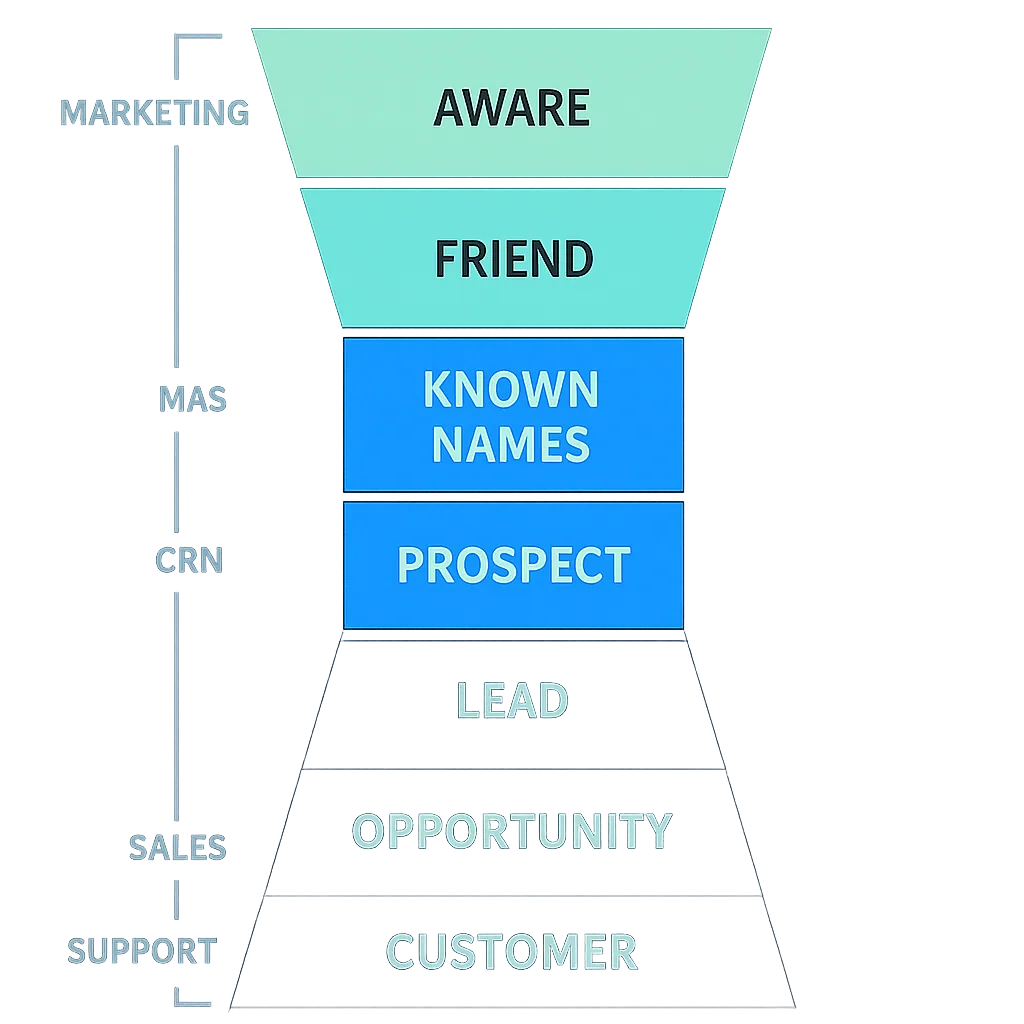
End-to-end funnel management typically combines marketing automation (top of funnel) with CRM functionality (bottom of funnel). A visible industry trend is that many leading CRM platforms are either acquiring or building their own marketing-automation systems. HubSpot, for example, integrates both natively, while others prioritize easy integration with standalone marketing-automation tools.
Here is a breakdown of the core functionalities typically offered by a CRM platform:
Lead management: A CRM tracks a company's leads, enabling marketing teams to enter new leads into the system (automatically or manually) and to track and analyze data about them.
Marketing automation: Platforms like HubSpot and Salesforce offer marketing-automation functionality to handle tedious, repetitive tasks in the funnel — for example, automatically sending marketing emails at marketer-defined times, or publishing social media posts on a schedule. The goal is to keep sales leads engaged and move them toward conversion.
Sales automation: CRMs can track customer interactions and automate selected business functions within the sales cycle, helping teams follow up on leads and pursue new customers more efficiently.
Workflow automation: By streamlining routine workloads, CRM systems free employees to focus on higher-level, creative tasks rather than administrative overhead.
Analytics: Built-in analytics tools provide insights into customer behaviour and campaign performance, helping marketers build targeted campaigns and track attribution. CRM analytics also support customer experience measurement and satisfaction tracking.
Artificial intelligence: Platforms like Salesforce include AI capabilities that automatically recognize patterns leading to successful sales, enabling more accurate forecasting and strategy for future campaigns.
Individualized customer experiences: CRMs can be used to create personalized, consistent experiences for prospects across multiple marketing channels, supporting both conversion rates and brand awareness.
Off-the-Shelf CRM Solutions
There are numerous commercial, ready-made CRM solutions available today. These platforms come in different shapes and sizes but are typically delivered as SaaS, offering combinations of sales, marketing, and customer-service functionality.
Below are a few widely used examples:
Salesforce is widely regarded as the leading off-the-shelf CRM. According to research firm Gartner, the cloud-based platform currently holds 19.7% of the CRM market.
HubSpot CRM is known for offering deep visibility into every prospect and granular control over the sales funnel. Real-time tracking of customer interactions helps teams understand needs and respond appropriately. HubSpot tracks the source of prospect visits, email engagement (clicks, opens, re-opens), and downloads of marketing materials. It also supports plugin integrations with Gmail and Outlook.
Salesflare is a CRM built to reduce manual data entry — it automatically populates contact information into customer profiles, with claims of reducing data-entry time by more than 70%.
Oracle CRM manages customer relationship processes on a single platform and supports a variety of deployment methods.
Microsoft Dynamics CRM closely trails Salesforce in market share. The platform has grown rapidly over the last several years and is available either on-premises or in the cloud.
SugarCRM is a leading open-source CRM platform, founded in 2004. It is popular with small businesses and supports both on-premises and cloud-based deployment. Pricing ranges from $35 to $150 per user per month.
Is an Off-the-Shelf CRM Solution the Right Fit?
Pre-built CRM solutions are designed to meet the expectations of a broad range of businesses. In practice, though, many of the features they include may be irrelevant to a given organization's actual needs.
Every extra feature carries a cost — not only financially, but in terms of the learning curve imposed on marketing and sales teams. Complexity compounds quickly: it takes significant time to train people on a system's full function set, and that cognitive overhead is a drag on productivity. Off-the-shelf platforms also require organizations to configure and deploy the entire software package, even when only a fraction of its features will ever be used.
Enterprise CRM platforms from vendors such as Salesforce, Oracle, and Microsoft are powerful, but there are common problems with out-of-the-box solutions:
- High ongoing subscription or licensing costs
- Excessive features that the company never uses
- Difficult integration with existing internal systems
- Limited extensibility and customization
- Minimal or no control over data ownership
- Variable GDPR-compliance standards (a vendor's interpretation of privacy laws may differ significantly from the company's own legal requirements)
Building a Custom CRM
For organizations where off-the-shelf tools are a poor fit, building a custom CRM is a viable alternative. The decision should be grounded in a careful review of the company's actual processes and requirements.
The core issue with ready-made CRMs — despite being functional and reliable — is that they package unnecessary or overbuilt features that may not serve the business well. A platform built specifically for a company's needs, by contrast, integrates cleanly with existing systems and reflects how the business actually works.
That development process requires active participation from both the development team and the client organization. Getting it right demands a thorough understanding of existing business processes, and the process itself is often an opportunity to evaluate which workflows are effective and which could be improved.
Benefits of a Custom CRM
Stripping down excess features. A custom-built CRM includes exactly what the business needs, without superfluous functionality. Development effort focuses on the features that matter. A lean, well-tailored CRM can cost a fraction of an enterprise off-the-shelf license while integrating far more effectively with the business.
Granular, business-specific reporting. A custom CRM can be designed around the company's processes rather than forcing processes to conform to the software. Teams can generate precise, detailed reports that provide a fuller picture of both customers and business performance.
Control over the feature roadmap. Owning the technology and development process means the business controls what gets built next and on what timeline — rather than waiting on a vendor's product schedule.
Lower long-term cost. Off-the-shelf CRMs carry significant licensing costs. Microsoft Dynamics CRM, for example, costs around $5,000 for the server software (plus approximately $1,100 per user), or $65 per user per month for the cloud version, Microsoft Dynamics CRM Online. While the upfront cost of custom development may be higher, the investment typically pays off over time. Because the software is built for the company's specific needs, there is no need to purchase add-ons when new requirements emerge, and adding new users does not require purchasing additional per-seat licences.
Data ownership. Most cloud-hosted CRMs store data in the vendor's databases. While APIs typically provide access to that data, it is not fully owned by the client company. For larger organizations with strict data-protection policies, this is a genuine concern. A custom, self-hosted CRM eliminates this problem entirely.
Better integration with existing systems. When a CRM is designed to work across sales, customer service, and technical support simultaneously, daily operations run more efficiently. Drawing data from multiple parts of the company enables a more complete customer view than any single department could achieve alone.
GDPR compliance on the company's own terms. One organization's interpretation of GDPR and other privacy regulations can differ significantly from a vendor's. A 2021 Demandbase report found that 80% of marketers were concerned that their MarTech vendors might expose their company to GDPR legal risks. Building a CRM in-house allows the platform to be configured in accordance with the company's own legal policies — including controls over user-rights requests like data access and deletion.
The CRM Platform Development Process
Building a well-integrated custom CRM requires more than a financial investment — it demands sustained focus on, and understanding of, the company's existing business processes. Because the development process involves active participation from the client organization, it also creates a valuable opportunity to step back and identify which internal processes are working well and which are not.
The development timeline may place additional demands on internal staff, but the resulting platform will accurately reflect how the business operates and map the customer journey in a way that generic tools cannot.
The Future of CRMs
Modern CRM systems are evolving well beyond their original function of aggregating customer data across channels. Social media integration, AI-driven insights, holistic customer profiling, and deeper personalization capabilities are all becoming standard features of leading platforms.
A custom-built CRM offers a distinct advantage here: because it is designed to scale alongside the business, it can incorporate emerging technologies on the company's own timeline — rather than waiting for off-the-shelf vendors to catch up. For organizations that want to stay ahead of the curve, building or extending a proprietary CRM remains one of the more durable strategic options in the MarTech stack.