Ad Targeting and Budget Control
In online advertising, targeting refers to displaying ads to users who match a defined set of criteria — age, location, interests, device type, browsing behaviour, and more.
Consider a straightforward example: an advertiser selling gardening products has determined its ideal audience consists of people between 30 and 50 years old living in rural areas of the US. The goal is to serve ads specifically to people who match those criteria, and avoid wasting budget on everyone else.
In direct deals between advertisers and publishers, targeting was traditionally handled by ad servers. An advertiser would specify targeting criteria in an insertion order — for instance, which pages or sections of a publisher's site to run ads on — and the publisher's AdOps team would configure those criteria in their ad server (the first-party ad server).
Ad servers remain central to targeting today, but many other AdTech platforms — demand-side platforms (DSPs) and supply-side platforms (SSPs) among them — now offer their own targeting capabilities. The discussion below covers targeting as it applies in the ad server context.
By setting targeting criteria for a campaign, an advertiser determines which web traffic is relevant to them. Below are the main targeting methods used in online advertising.
Contextual Targeting
Contextual targeting lets advertisers serve relevant ads based on the content of a webpage rather than data about the person visiting it. Magazines and newspapers have relied on this logic for decades — an ad for hiking boots belongs in an outdoor recreation article, not a recipe column.
Example of contextual targeting
Many advertisers and publishers use contextual targeting either on its own or layered with other methods, because it works especially well for content-driven environments.
How Contextual Targeting Works
How contextual targeting works
The process works as follows:
- A web crawler scans URLs and categorizes the content and ad placements found there.
- When a visitor loads a page, information associated with that URL is passed to the ad server via the ad request.
- The ad request — including contextual metadata — is forwarded to other AdTech platforms such as ad exchanges and SSPs.
- Ad exchanges and SSPs relay the contextual information to DSPs, which bid on the impression.
- The winning DSP delivers the ad back to the publisher, and the ad is displayed to the visitor.
Benefits of Contextual Targeting
Contextual targeting may appear simpler than behavioural approaches, but it offers meaningful practical advantages:
- Most contextual ads don't rely on personal data, which reduces exposure to privacy and data-protection regulations like the GDPR.
- Contextual ads tend to offer stronger brand-safety protection.
- A 2016 study found that contextual ads can increase purchase intent by 63%.
- Users find contextual ads less intrusive than behaviourally targeted ones, while the ads can still reflect genuine user interests — for example, showing smartphone plan ads to someone reading a smartphone review.
Keyword Targeting
Keywords give advertisers a precise signal about the type of content a visitor is consuming, making them valuable targeting variables.
Ad servers can identify keywords on a given page in a couple of ways: through editor-applied tags that highlight key topics covered in the content, or by extracting keywords from the page directly — usually via JavaScript or server-side web crawling.
Those keywords are typically passed to the ad tag so the ad server receives them in the ad request and factors them into its decisioning process when choosing which ad to serve.
For example, an advertiser promoting a new smartphone plan would target pages containing keywords like smartphone or mobile phone.
Ad Slot and Ad Position
Advertisers can also target based on the size or position of an ad slot — for instance, only serving into 728×90 px banners located at the top of the page.
This type of targeting is fairly broad on its own and is typically combined with other methods.
Publisher URL Targeting
Targeting based on publisher URL is conceptually similar to how advertisers choose placements in print media. By serving ads on specific websites, advertisers can reach audiences based on topical interest rather than individual demographic attributes.
There are multiple levels at which URL-based targeting operates:
Domain
Advertisers can target based on a publisher's domain name. This applies mainly in direct advertiser-publisher relationships where the publisher operates multiple websites. It's closely linked to run-on-site (ROS) targeting in ad networks, where advertisers run ads across a specific domain.
Section and Specific URLs
Advertisers can also target specific sections of a site. A news site covering many topics, for example, might allow an advertiser to target only the technology section or entertainment section.
The challenge is that sections aren't always identifiable from the URL alone — the publisher may need to pass the section name explicitly in the ad tag so the ad server can use it as a targeting variable. This approach is often associated with run-on-network (RON) targeting, where ads run across a defined group of websites.
IP Address and Geolocation Targeting
Geolocation targeting serves ads to users based on their physical location at the time of the ad request.
For example, someone reading a news article on a laptop in Chicago might see ads for local shops, restaurants, and services in the Chicago area.
The mechanism is straightforward: when an ad server receives a request from a user's browser, it captures the IP address and maps it to a physical location using an external database — such as MaxMind or Neustar — resolving location to the country, region, and city level.
| IP Address | Country Code | Location | Postal Code | Approximate Coordinates* | Accuracy Radius (km) | ISP | Organization |
|---|---|---|---|---|---|---|---|
| 209.95.50.164 | US | New York, New York, United States, North America | 10011 | 40.7308, -73.9975 | 500 | WestHost | Hosting Services Inc |
Native mobile apps can go further, passing the exact longitude and latitude from a device's GPS sensor to the ad server. This enables targeting within a defined radius of a specific point — say, within five miles of a retail location — making geolocation considerably more precise than IP-based methods alone.
That said, even GPS data can occasionally be inaccurate or, in some cases, fraudulent. To improve reliability, some data companies aggregate and cross-reference multiple data points and sensors.
A practical illustration: a consumer sitting on a bench in downtown New York playing a mobile game could see an ad from a nearby coffee chain prompting them to visit a location five minutes away.
Browser Type, Operating System, and Device Targeting
Every ad request carries a user-agent HTTP header. For example:
User-agent: Mozilla/5.0 (iPhone; CPU iPhone OS 10_2_1 like Mac OS X) AppleWebKit/602.4.6 (KHTML, like Gecko) Version/10.0 Mobile/14D27 Safari/602.1
In the example above, 14D27 identifies an iPhone 7 Plus running iOS 10.2.1.
From the user-agent string, it's possible to parse the operating system, browser type and version, and — in the case of mobile devices — the device brand and model.
Targeting based on hardware or software lets advertisers reach audiences with highly relevant messaging. A mobile gaming company, for instance, could target ads for its new Android game specifically to users on Android-powered smartphones and tablets.
IAB Content Taxonomy
The IAB maintains a standard taxonomy for categorizing websites and content. Advertisers can use these categories to purchase relevant ad inventory and, equally, to exclude categories that conflict with their brand.
Below is a condensed excerpt from the taxonomy:
| Unique ID | Tier 1 | Tier 2 | Tier 3 |
|---|---|---|---|
| 1 | Automotive | ||
| 2 | Automotive | Auto Body Style | |
| 3 | Automotive | Auto Body Style | Commercial Trucks |
| … | … | … | … |
| 52 | Business and Finance | ||
| 53 | Business and Finance | Business | |
| 54 | Business and Finance | Business | Business Accounting & Finance |
| … | … | ||
| 223 | Healthy Living | ||
| 224 | Healthy Living | Children's Health | |
| 225 | Healthy Living | Fitness and Exercise | Participant Sports |
| … | … | … | … |
| 239 | Hobbies & Interests | ||
| 255 | Hobbies & Interests | Arts and Crafts | Photography |
| … | … | ||
| 656 | Travel | Travel Locations | Africa Travel |
| 657 | Travel | Travel Locations | Asia Travel |
| 658 | Travel | Travel Locations | Australia and Oceania Travel |
| … | … |
The IAB Content Taxonomy contains over 30 Tier 1 categories and over 1,100 individual entries.
Below is a portion of the IAB Content Taxonomy from the OpenRTB (version 2.4) specification, which includes 390+ content categories:
IAB content category examples
Source: Github
Day of Week and Time of Day
Serving ads at specific times — by day of the week or hour of the day — lets advertisers reach their audience when they're most receptive and avoid burning budget during low-engagement windows.
A pizza restaurant chain, for example, could advertise Friday-night specials specifically on Friday afternoons between 3–8pm. Likewise, if engagement data shows that a brand's audience is most active at certain hours, concentrating delivery during those windows increases the likelihood of reaching the right person at the right moment — improving click-through rates and conversions while reducing wasted spend.
Behavioural Targeting
Behavioural targeting — also called online behavioural advertising (OBA) — serves ads based on a user's browsing history and online actions rather than the content of the page they're currently viewing.
Data collected for behavioural targeting typically includes:
- Pages viewed
- Previous search terms
- Time spent on a website
- Ads and buttons clicked
- Content viewed and downloaded
- Purchases
- Date of the last website visit
- Other interactions across websites and apps

The behavioural targeting process has three main steps:
1. Data Collection
Advertisers, publishers, and data-management platforms (DMPs) collect data about user actions across different websites and apps. This event data includes page views, product views, purchases, and other interactions. The data is tied together via identifiers stored in first-party cookies, third-party cookies, or mobile advertising IDs.
User profiles are then created to consolidate a given user's event data in one place. An identifier — such as a third-party cookie ID or mobile ID — links the user to their actions across different sites and ensures event data is attributed to the correct profile.
2. Audience Creation
Advertisers and publishers build audiences composed of individual user profiles. For example, an advertiser might create an audience of people who have viewed a specific product more than three times in a month, have signed up for a newsletter, and have visited the site at least 15 times in the past 60 days.
3. Application of Data
The advertiser uses those audience segments for targeting in live media campaigns. The result is ads that are more relevant to each user, improving the probability of conversion.
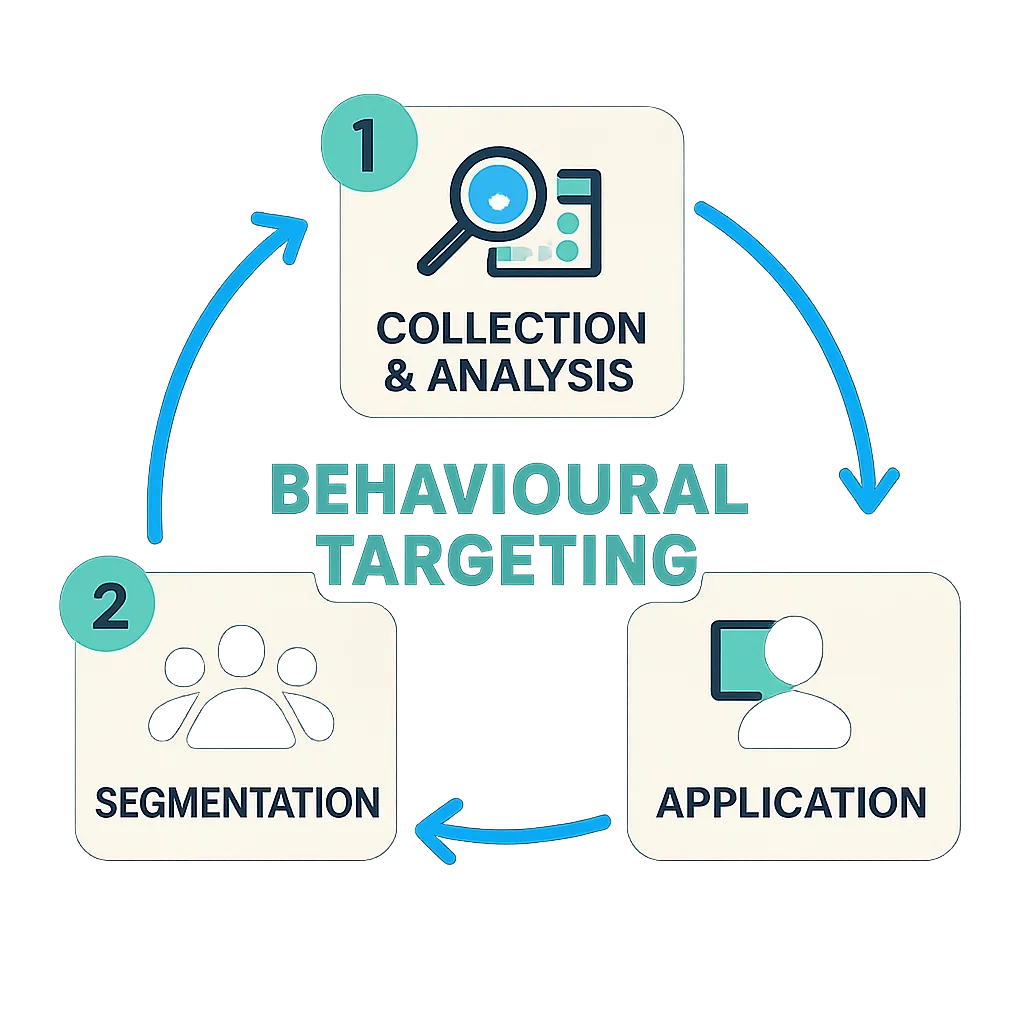
The three main steps of the behavioural targeting process.
Benefits of Behavioural Targeting
The depth of data available to marketers allows for detailed user profiles and highly tailored ad delivery. The underlying premise is that both the user and the publisher benefit: users see ads they're genuinely interested in, which improves the overall experience on the site.
That said, increased public awareness of how advertising companies collect and use personal data has driven concern among users and contributed to the widespread adoption of ad-blocking software.
Challenges of Behavioural Targeting: Privacy Laws and Browser Settings
Privacy legislation like the General Data Protection Regulation (GDPR) directly challenged behavioural targeting by imposing stricter rules around cookie storage and the use of personal data. Marketers operating under these regulations have had to reduce their reliance on behavioural data and explore alternatives that don't depend heavily on personal data collection.
Browser-level privacy changes compound the challenge. Safari's Intelligent Tracking Prevention (ITP) and Firefox's Enhanced Tracking Protection (ETP) both block third-party cookies by default. Google Chrome — the most widely used browser globally — will also disable support for third-party cookies. Apple has also restricted how its Identifier for Advertisers (IDFA) can be accessed by app developers and AdTech companies, further limiting cross-app behavioural tracking.
Taken together, these changes make running behavioural advertising campaigns significantly more constrained. Some platforms that previously centred their value proposition on behavioural targeting have begun pivoting toward contextual advertising, where relevance is derived from page content rather than user data. The shift, however, is gradual — given the substantial time, cost, and infrastructure investment the industry has made in behavioural data collection over the years.
Retargeting
Retargeting involves showing ads to users who have previously interacted with a brand. A visitor who looked at a pair of shoes on an e-commerce site, for example, is likely to see ads for those same shoes — or similar ones — as they browse other websites.
The mechanism works by placing a 1×1 transparent image (a pixel) on a webpage. When the page loads, the pixel fires a request to an AdTech platform — typically a DSP. As the DSP returns the image, it creates a cookie (if one doesn't already exist) and saves it to the visitor's device.
When that visitor later arrives at a different website, the DSP recognizes the cookie and serves the retargeted ad.
Here's a visual representation of how retargeting works:
How retargeting works
Walking through the diagram:
- An online shopper visits a shoe retailer and views a specific pair of shoes.
- Retargeting code in the site's footer sends a request for a 1×1 pixel.
- The retargeting service returns the pixel and sets a cookie under its own domain, storing information about the shopper's behaviour, including the product they viewed.
- The shopper later visits a different site and sees an ad for the exact pair of shoes they viewed on the retailer's site.
The DSP identifies the same user across different websites by syncing cookies with other AdTech platforms — SSPs and ad exchanges in particular.
As with behavioural targeting broadly, many users have grown to dislike retargeted ads for the feeling that they're being followed around the internet.
Demographic Targeting
Demographic targeting is one of the most powerful targeting methods available — particularly when combined with other criteria — but it's also one of the hardest to operationalize. Most publishers don't collect demographic data from their visitors directly. The exceptions are large platforms like Facebook and Google, which gather this data as part of the user registration and profile process.
Demographic variables include:
- Age
- Gender
- Annual income
- Marital status
- Parental status
- Occupation
For example, an advertiser promoting baby products could target female users between 20 and 40 years of age with at least one child, layering demographic criteria with other targeting methods to refine delivery.
When running campaigns on independent AdTech platforms (i.e., not Google, Facebook, LinkedIn, or similar), advertisers can apply demographic targeting using audience segments from a DMP or via the data contained in the User object in OpenRTB bid requests.
On platforms like Google and Facebook that collect demographic data directly from users, the setup is more straightforward — advertisers simply configure demographic targeting criteria within the platform's interface.
An example of demographic targeting when advertising on Facebook.
An example of demographic targeting configured in Facebook's advertising interface.
Controlling a Campaign's Budget
Effective campaign management isn't just about targeting the right audience — it also means controlling how budget is spent. The goal is to reduce ad waste: inventory an advertiser pays for that doesn't reach the intended audience, whether because it was shown to the wrong user, a bot, or simply at the wrong time.
Ad waste can result from poor viewability, ad fraud, or inefficient frequency management — topics covered elsewhere in detail. The following mechanisms, implementable in both ad servers and DSPs, are the primary tools for budget control.
Budget Capping
A budget cap sets a hard limit on spending. A daily budget cap of $150, for example, means the campaign stops serving ads once that amount has been spent that day.
Budget capping involves setting both a total campaign cap and a daily cap. Once the daily budget is exhausted, delivery pauses until the next day.
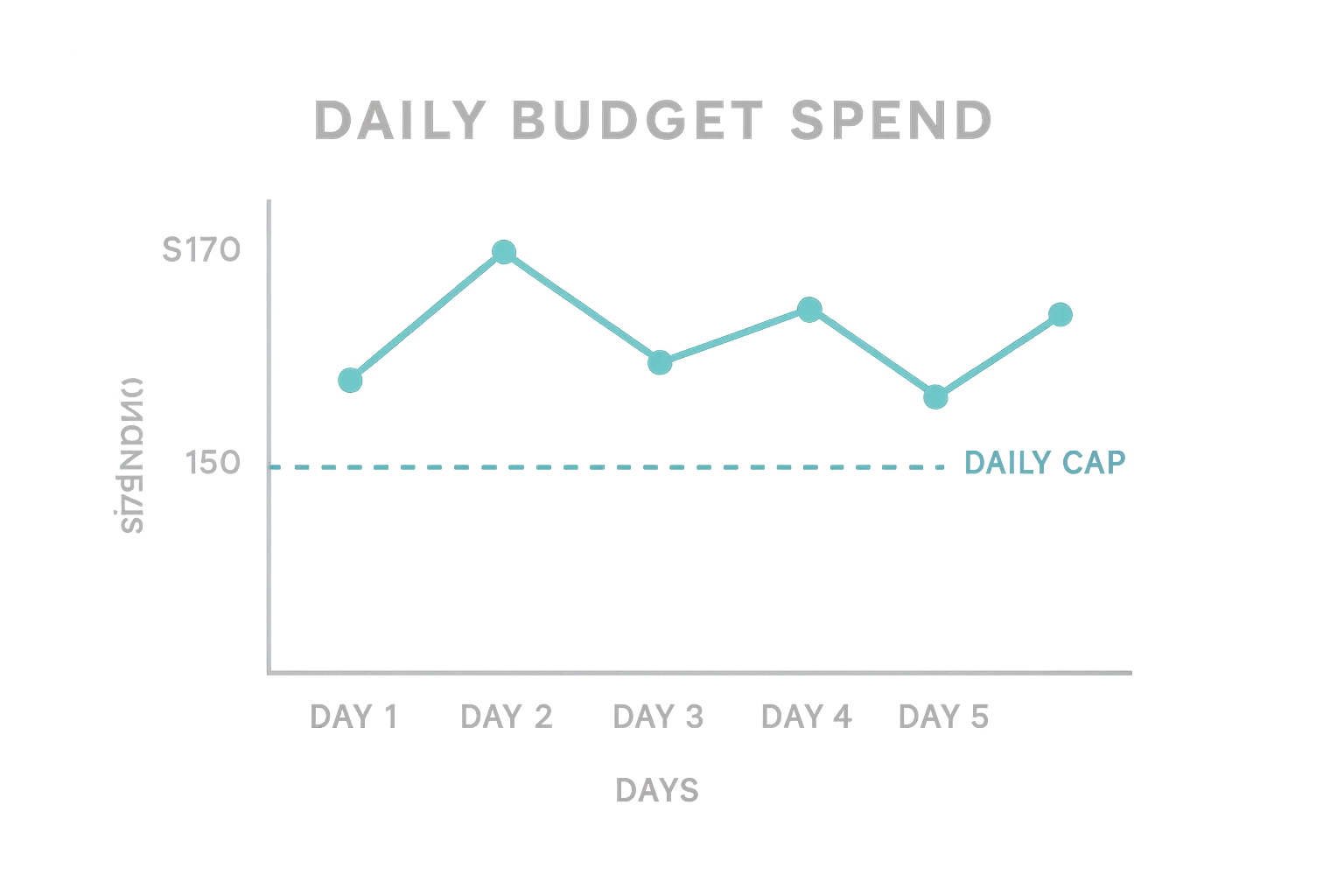
Some platforms add a percentage buffer — for example, 20% — on top of the daily budget to help advertisers maximize delivery on days with high available inventory. However, a larger daily cap may also cause the campaign budget to be consumed prematurely.
Budget Distribution (Pacing)
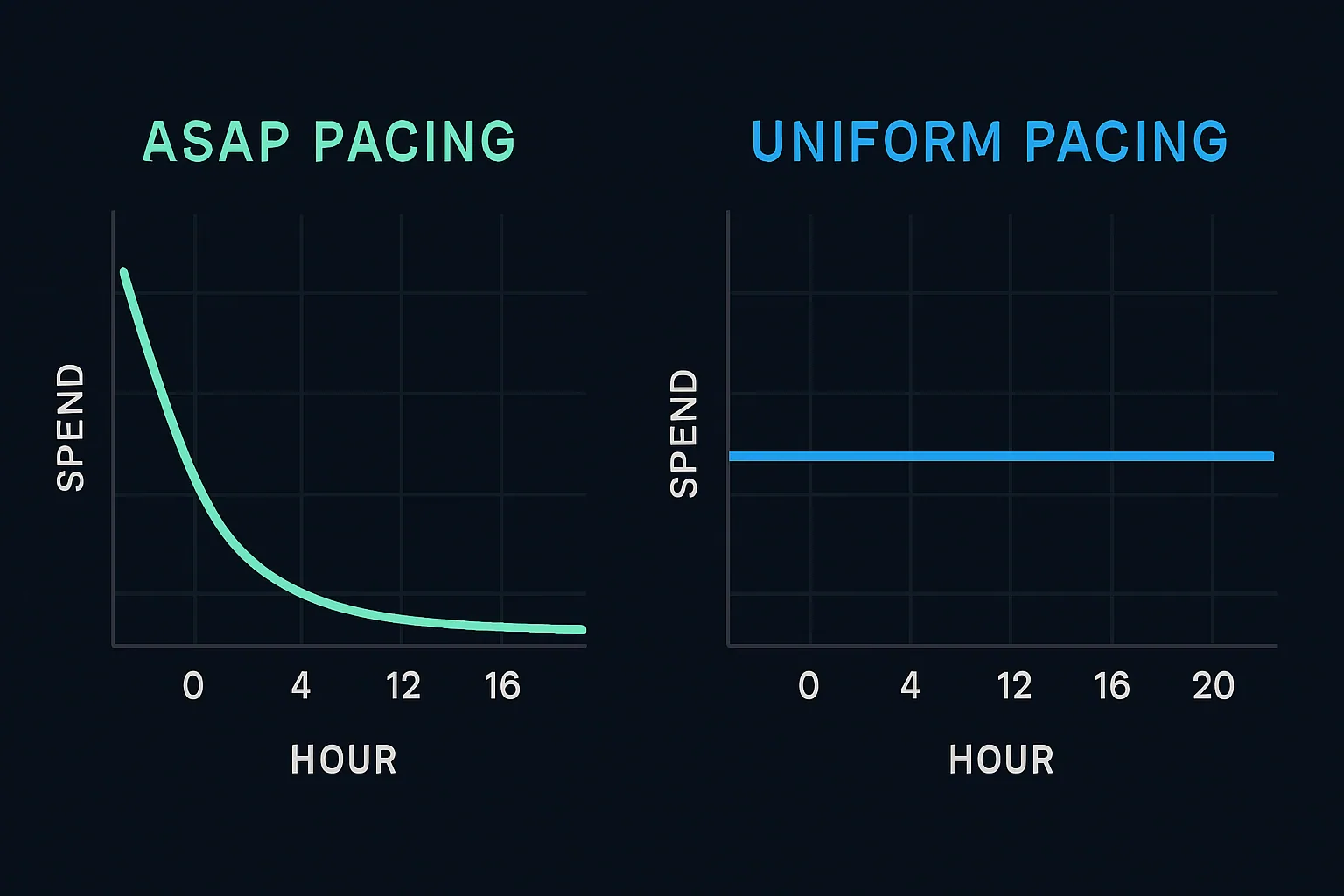
Pacing refers to the rate at which a campaign's budget is spent, which in turn determines how many impressions are served over any given period within the campaign's flight dates.
There are two primary pacing approaches:
- ASAP pacing: Deliver the maximum number of impressions as quickly as possible.
- Uniform pacing: Distribute impressions evenly across the campaign's proposed run dates.
Examples of ASAP and uniform pacing:
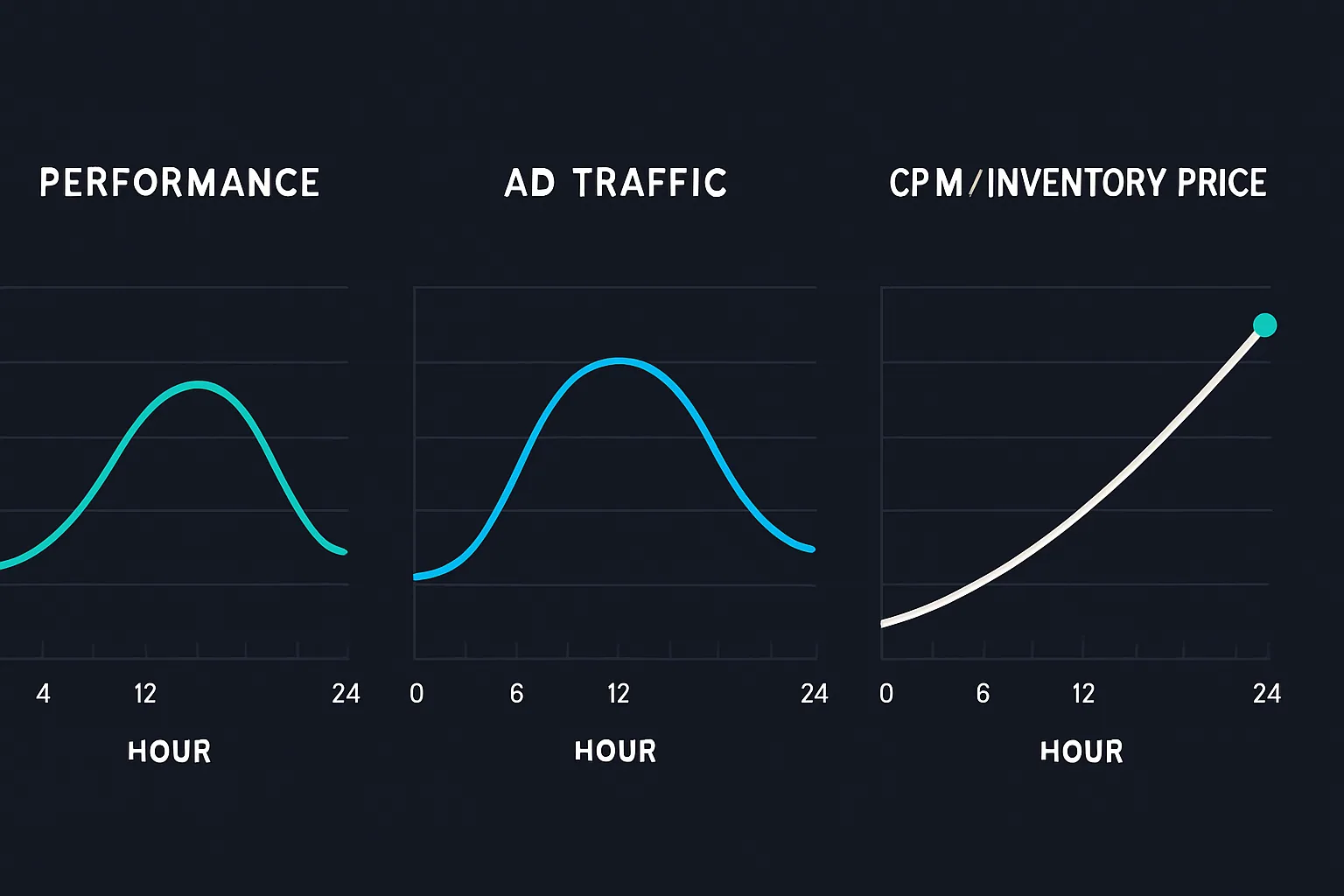
In practice, pacing also needs to account for the natural fluctuation of ad traffic throughout the day and the availability of impressions that match the campaign's targeting criteria.
Ad platforms dynamically adjust the pace of spend based on performance, traffic availability, and the price of the inventory or audience:
Frequency Capping
Frequency capping limits the number of times the same ad is shown to a given user within a defined time window — for example, no more than three impressions per visitor per 24 hours.
Frequency capping matters for several reasons:
- It reduces budget waste.
- It improves a campaign's overall reach by redistributing impressions to users not yet exposed.
- It prevents overexposure — the user frustration that builds when the same ad appears too many times.
An example of frequency capping configured in Google Ads.
Three impressions per visitor per 24 hours:
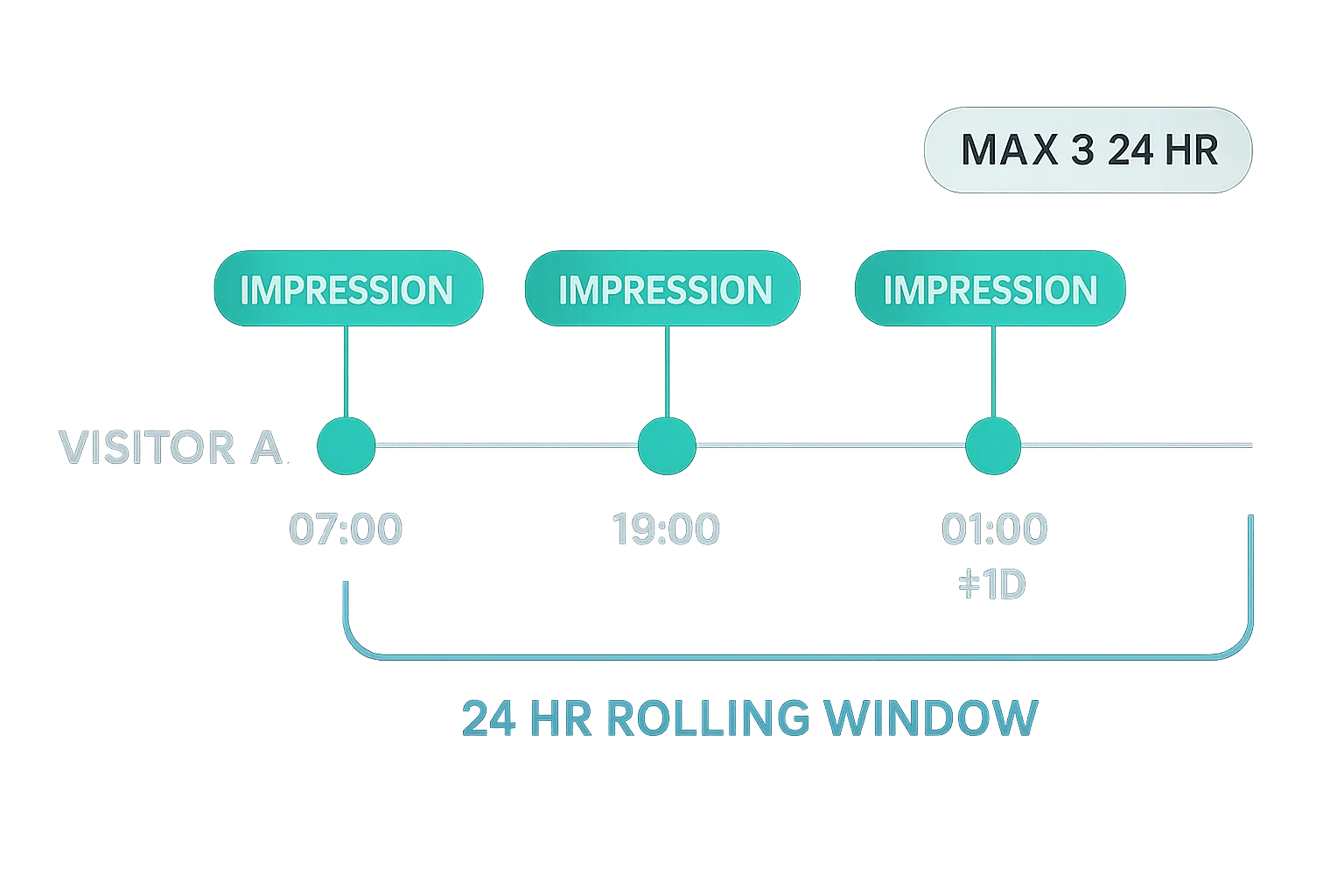
Each time frequency capping is evaluated, the system counts impressions within the defined time window. For a 24-hour cap of three impressions, those could fire at 7:00, 19:00, and 1:00 the following day — the user will never see the same ad more than three times within any rolling 24-hour period.
How Frequency Capping Is Implemented
The ad server tracks and stores the number of times an ad from a given campaign has been shown to a user, based on identifiers such as cookies, device IDs, or device fingerprints. This data is stored server-side (within the ad server) alongside the user's identifier.
This per-user exposure information forms what AdTech platforms commonly call user profiles: records that associate a cookie ID or device ID with the ads a user has seen.
These profiles are typically stored in in-memory or fast-access databases so the information can be retrieved quickly during the ad server's decisioning process.
Storing this data client-side — in a third-party cookie — is not practical for two reasons:
- Cookie size would grow substantially: instead of a single identifier, each cookie would need to store ad IDs, impression counts, and timestamps.
- The approach doesn't translate to other identification methods, such as mobile device IDs (Google's AdID or Apple's IDFA).
Summary
- Targeting allows advertisers to reach specific users based on a wide range of criteria, from contextual signals and geographic location to behaviour and demographics.
- The most widely used targeting methods are contextual, behavioural, and demographic — each with distinct trade-offs around data reliance, privacy exposure, and precision.
- Privacy legislation (GDPR) and browser-level changes (Safari ITP, Firefox ETP, Chrome's deprecation of third-party cookies) have materially constrained behavioural targeting, pushing parts of the industry toward contextual approaches.
- Budget control tools — caps, pacing, and frequency capping — are built into ad servers and DSPs and are essential for minimizing ad waste and maximizing campaign efficiency.