User Identification in Digital Advertising
Understanding how AdTech platforms identify users is fundamental to grasping how digital advertising works. Without reliable user identification, the core functions of modern advertising — behavioural targeting, retargeting, frequency capping, conversion tracking, and campaign measurement — would be impossible to execute.
Why User Identification Matters
The ability to identify a user (or at least a device) underlies nearly every meaningful action in a programmatic campaign:
- Powering behavioural targeting and content personalization
- Running retargeting and remarketing campaigns
- Measuring campaign reach
- Tracking conversions
- Attributing sales and conversions to impressions and clicks
- Applying frequency capping
Different User-Identification Methods
The identification method used depends on the type of device and the environment in which the user is browsing. A user visiting web pages in a browser — on either a mobile device or a desktop — is identified through browser-based methods. A user playing a game inside a native mobile app on a smartphone is identified through a mobile device identifier. These two environments work very differently, and it's worth examining each in detail.
Web Browser Identification
Web browsers have existed since the earliest days of the Internet and remain the dominant environment for online advertising. According to Statcounter, the global browser market share as of 2021 was roughly:
- Google Chrome: 64%
- Apple Safari: 18%
- Mozilla Firefox: 3%

Source: Statcounter, 2021.
These figures shift considerably by geography and device type. In Germany, for instance, Firefox holds approximately 12% market share — four times its global figure.

Device also matters: Apple's Safari is the dominant browser on iOS devices (iPhones and iPads), while Chrome dominates on Android.
The three primary browser-based identification methods are cookies, device fingerprints, and HTML5 local storage.
Cookies
Cookies — also referred to as web cookies, HTML cookies, or browser cookies — are small files placed on a user's device by a web server when a website is accessed.
Web cookies were created by Lou Montulli in 1994 to solve a fundamental limitation of the HTTP protocol. HTTP is stateless: it can receive requests and return responses, but it cannot retain any data between interactions. Cookies were developed to work around this by allowing browsers to store and pass state information to web servers.
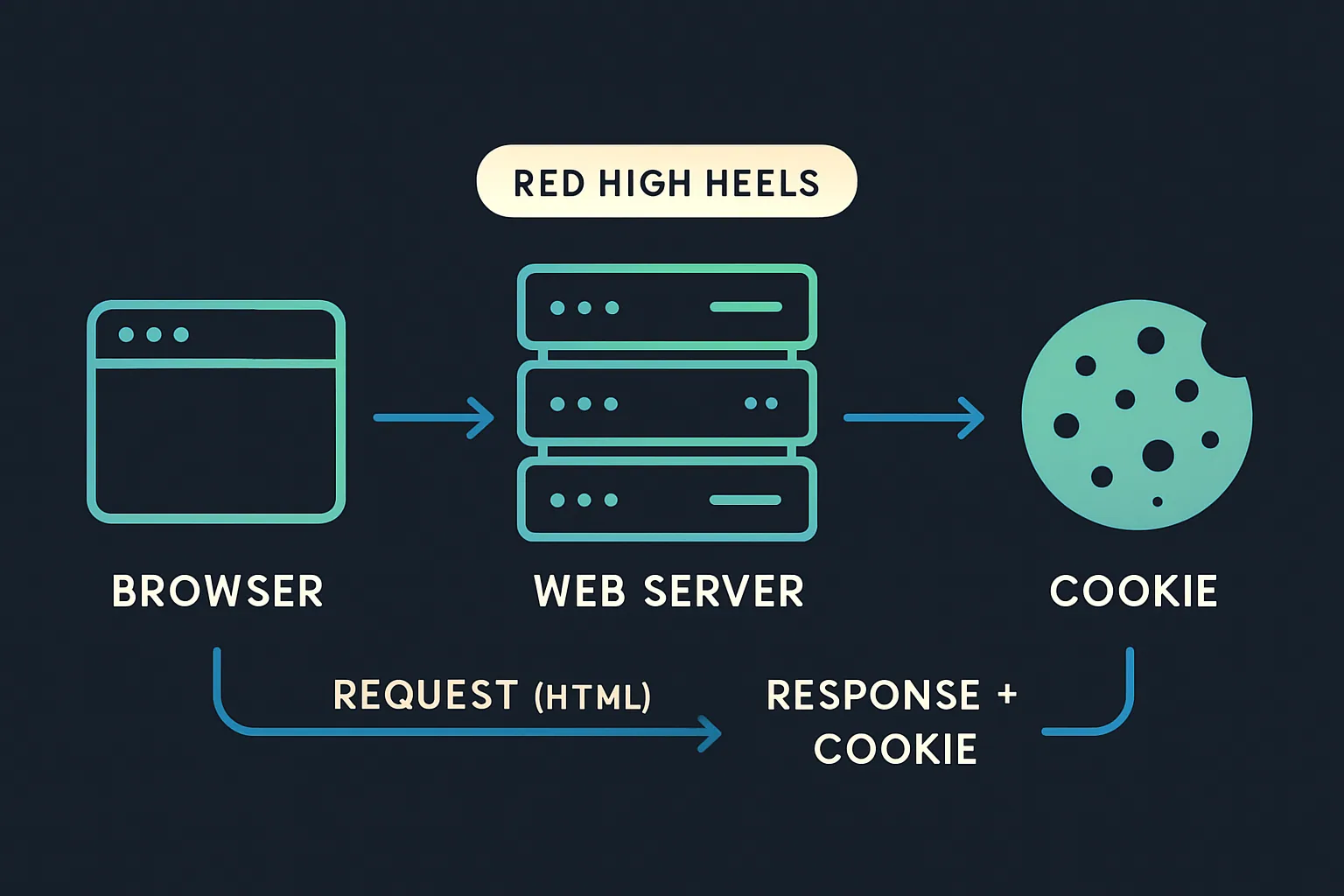
When a user returns to a previously visited site, cookies allow the site to recall context — what content was viewed, which pages were accessed, what was in a shopping cart. Common use cases include:
- Website setup: Remembering user preferences like language or currency settings.
- Sign-in persistence: Storing a session ID so users remain logged in across browser sessions.
- eCommerce: Tracking viewed products, cart contents, and purchase history.
- Analytics: Associating user interactions — page views, clicks, goal completions — under a single profile and session.
- Behavioural targeting and advertising: Identifying users to serve relevant ads based on prior browsing behaviour, and tracking which ads they've seen or clicked.
Cookies have been the most common browser-based identification method since the early Internet. However, their effectiveness is declining due to privacy regulations like the EU's General Data Protection Regulation (GDPR) and browser-level privacy features such as Safari's Intelligent Tracking Prevention (ITP) and Firefox's Enhanced Tracking Protection (ETP).
First-Party vs. Third-Party Cookies
There are two primary types of cookies, distinguished by the relationship between the creating domain and the site being visited.
First-party cookies are created by the domain the user is directly visiting. If a user navigates to techcrunch.com, that site creates first-party cookies stored on the user's device. First-party cookies are typically used to enhance the user experience — remembering language preferences, shopping cart contents, and login credentials.

While first-party cookies can play a role in advertising, their usefulness is inherently limited: a first-party cookie set by ssp1.com on techcrunch.com cannot be read by ssp1.com on a different website. This cross-domain limitation is why the AdTech industry developed third-party cookies and cookie syncing.
Third-party cookies are created by domains other than the one the user is visiting. When a user lands on techcrunch.com and the page loads JavaScript from an AdTech platform (e.g., ssp1.com), a third-party cookie is created for ssp1.com's domain. Because ssp1.com is not the site being visited, that cookie is classified as third-party.
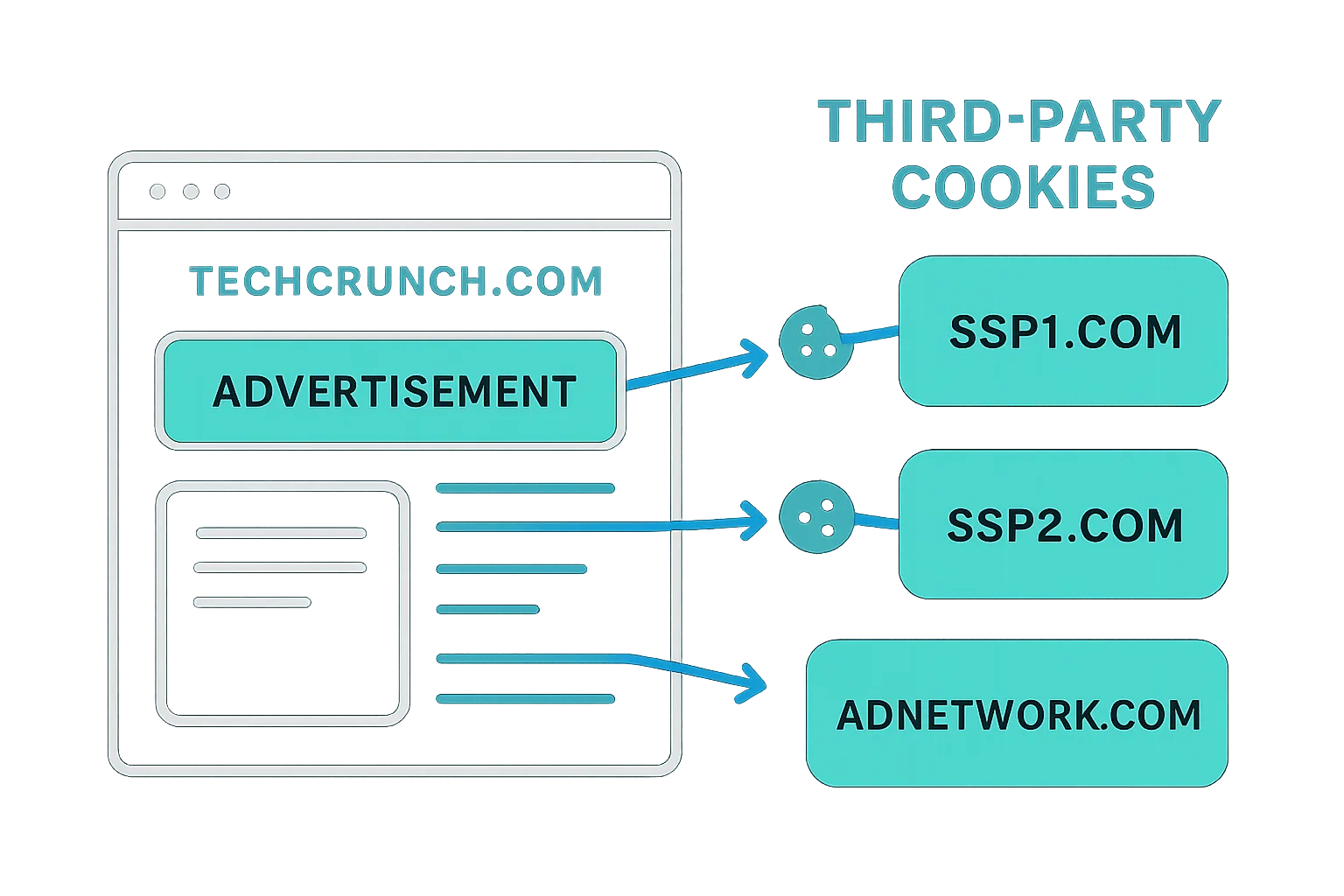
Third-party cookies have historically been the backbone of online advertising — enabling cross-site user tracking, behavioural targeting, and attribution of impressions, clicks, and conversions. However, they are increasingly restricted by GDPR, Safari's ITP, Firefox's ETP, and browser extensions like AdBlock Plus and Ghostery.
How First-Party and Third-Party Cookies Are Created

AdTech platforms can create cookies either via the ad creative when it loads from their server, or via a 1×1 transparent pixel image. The transparent pixel's sole purpose is to trigger a browser request to the AdTech platform's server — so the server can set a cookie in its response.
Comparing First-Party and Third-Party Cookies
| First-Party Cookies | Third-Party Cookies | |
|---|---|---|
| Setting and Reading the Cookie | Can be set and read by the publisher's web server or JavaScript loaded on the website | Can be set on different websites via JavaScript or by loading resources from servers (e.g. 1x1 transparent pixels). Once a third-party cookie is set to a user's device, it is read when the user visits other websites that also load the AdTech platform's JavaScript or request a resource. |
| Availability | It can only be read by the domain that the user is visiting. | It's available on any website that loads the AdTech platform's JavaScript or 1x1 transparent pixel. However, many popular web browsers like Safari and Firefox block third-party cookies by default. |
| Browser Support | Supported by all browsers. | Supported by all browsers, but some web browsers no longer support third-party cookies (e.g. Safari and Firefox). |
| Blocking and Deletion | Relatively small deletion rates. The exception is Safari's Intelligent Tracking Prevention feature that either deletes first-party cookies after 24 hours or seven days. More on that at the end of this chapter. | An increasingly high deletion and blocking rate. Third-party cookies are blocked by browsers such as Tor, Safari and Firefox, and also blocked by ad-blocking browser plugins like AdBlock Plus and Ghostery. |
A Note on Flash Cookies
Flash cookies functioned similarly to HTTP cookies but were created through the Adobe Flash Player plugin, which powered browser-based video and interactive content. A decade or so ago, Flash cookies became a significant privacy concern: they were stored in a separate folder on the user's device, managed only through Adobe Flash settings, and were unaffected when users cleared their HTTP cookies.
In response, Adobe and major browsers updated their handling of Flash cookies so they are now deleted alongside HTTP cookies. Given that most video and interactive content has migrated to HTML5, Flash cookies are essentially defunct and no longer used in online advertising.
Cookie Syncing
Because a cookie created by one domain cannot be read by another domain, different AdTech platforms operating on the same web page will assign different user IDs to the same individual. An SSP and a DSP loading on the same publisher page will each see the user as a distinct, unrecognized visitor.
Cookie syncing was developed to solve this. It is the process of mapping a user ID held in one platform's cookie to the corresponding user ID in another platform's cookie, and then sharing user data between the two platforms based on that mapping. Platforms engage in cookie syncing via formal agreements and set up partner IDs and syncing pixels in their respective systems.
Cookie syncing is carried out across the AdTech ecosystem by DMPs, DSPs, SSPs, ad networks, ad exchanges, and other platforms.
How Cookie Syncing Works
The process has two distinct stages: mapping cookie IDs and sharing user data.
Mapping Cookie IDs
When a user visits a publisher page containing a cookie-syncing pixel or AdTech tag, the browser sends a request to an AdTech platform — for example, a DSP.
The DSP creates a unique user ID (if one doesn't already exist) and stores it in a cookie. It then redirects the request to a cookie-syncing endpoint URL supplied by a second platform — say, a DMP — passing its user ID as a URL parameter.
The DMP's server reads the DSP's user ID from the URL parameter, then checks its own domain for an existing cookie for that user. If none exists, the DMP creates its own user ID and records the mapping between its ID and the DSP's ID in a cookie-matching table.
The DMP can also pass its own ID back to the DSP via a pixel redirect, making the sync bidirectional. At the end of the process, both platforms hold each other's user IDs in their respective databases.

Sharing Data Between Platforms
Once IDs are mapped, the platforms can share or request user data by referencing each other's IDs. This data transfer typically occurs via a server-to-server integration in large batch files. Unlike the real-time ID-mapping step, the data-sharing step usually happens on a schedule — for example, once per day.
It's worth noting that cookie syncing is exclusively a browser-side mechanism — it applies to desktop and mobile web browsing across display, native, and video ad formats. Native mobile apps use device-level advertising IDs (such as IDFA and AID) to identify users consistently, making cookie syncing unnecessary in that environment.
Limitations of Cookie Syncing
Cookie syncing has several practical drawbacks:
- Each additional cookie sync on a page adds latency, potentially degrading the user experience.
- Match rates vary across platform pairs, with average rates typically sitting between 40–60%.
- Cookie churn — caused by users deleting cookies or browsers blocking third-party cookies by default — steadily erodes the accuracy and reach of synced audiences.
Cookie Respawning
Cookie respawning is the process by which a deleted cookie is recreated. When a user revisits a site after deleting their cookies, backed-up data stored elsewhere on their device is used to regenerate the original cookie.
The typical sequence:
- A user visits a website; the site creates a cookie with a unique identifier.
- The user leaves and deletes their cookies.
- When the user returns to the site, the backup data recognizes the persistent identifier and recreates the original cookie.
Two mechanisms enable cookie respawning:
- Flash cookies: The Adobe Flash Player plugin stores user data in a separate location. Even after HTTP cookies are cleared, Flash-stored data can be used to recreate them. As noted above, Flash cookies are now largely obsolete.
- HTML5 local storage and ETags: HTML5 local storage and cache cookies can use entity tags (ETags) to respawn HTTP cookies by recognizing the persistent identification element (PIE) created by JavaScript or Flash.
Device Fingerprinting
Device fingerprinting is a technique that identifies and tracks users based on the characteristics of their device and browser configuration. Rather than storing an ID on the user's device, it aggregates multiple data points to construct a composite identifier — a "fingerprint" — that is unique (or highly unique) to that device.
While many users may own the same model of device, individual configurations differ based on installed software, preferences, and settings. The combination of these differences is what makes fingerprinting viable.
Data typically used to construct a device fingerprint includes:
- Browser version
- Operating system
- Language settings
- Installed plugins and fonts
- Location and time zone
- Browser settings and configuration
| Attribute | Similarity Ratio (All time) | Value |
|---|---|---|
| User agent | 0.04% | Mozilla/5.0 (Macintosh; Intel Mac OS X 10.14; rv:70.0) Gecko/20100101 Firefox/70.0 |
| Accept | 52.93% | text/html,application/xhtml+xml,application/xml;q=0.9,*/*;q=0.8 |
| Content encoding | 63.61% | gzip, deflate, br |
| Content language | 27.80% | en-US,en;q=0.5 |
| Upgrade Insecure Requests | 20.45% | 1 |
| Do Not Track | 9.57% | 1 |
| Referer | 11.80% | https://amiunique.org/ |
The image above illustrates how unique certain attributes are, expressed as a similarity ratio. For instance, a user agent with a 0.04% similarity ratio is highly distinctive — the more unique an attribute, the more useful it is for identification.
You can inspect your own device fingerprint at https://amiunique.org or https://panopticlick.eff.org/.
Why Device Fingerprinting Is Used
Device fingerprinting emerged as a response to the declining reliability of cookies. As users increasingly delete or block cookies — through browser settings or ad-blocking extensions — AdTech and analytics platforms needed an alternative identification method.
Although device fingerprinting is less accurate than cookies, it can serve as a fallback when cookies are unavailable, or be used in combination with cookies to improve identification rates.
How Device Fingerprinting Works
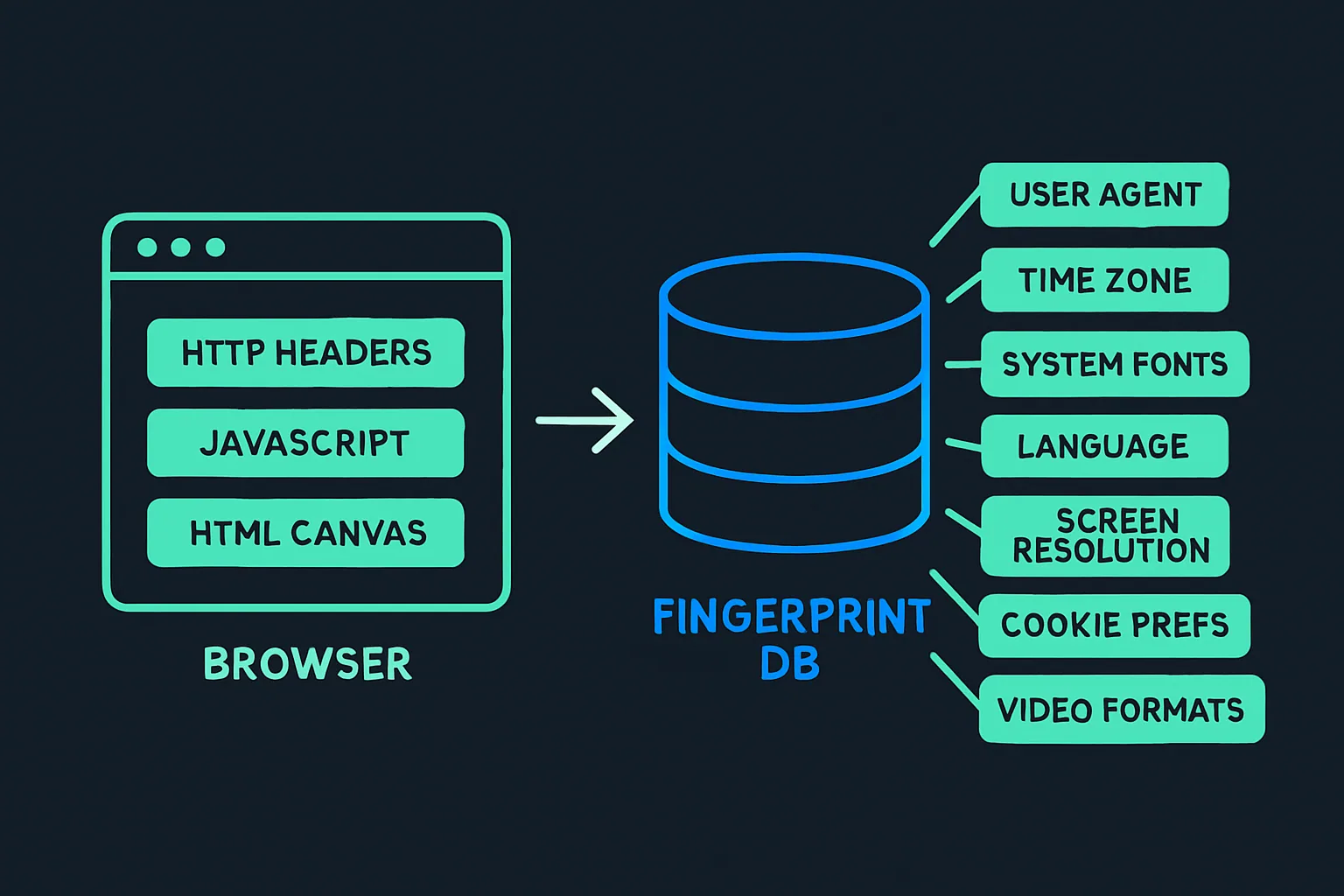
Fingerprinting data is typically collected through:
- The user agent and HTTP accept headers
- JavaScript execution
- The Flash plugin (if installed)
- HTML5 canvas elements
Canvas Fingerprinting
Canvas fingerprinting is a specialized variant that uses only the HTML5 canvas element. A JavaScript snippet instructs the browser to render an image using the canvas API. Because rendering is handled differently by each browser and hardware configuration, the resulting image differs slightly across devices, creating a highly unique identifier.
Once all data points are gathered, they are combined into a unique hash assigned to that device. Unlike cookies — which are stored client-side on the user's device — device fingerprints are stored server-side in a database, given the volume of data involved.
HTML5 Local Storage
HTML5 local storage is a browser-side storage mechanism that provides an alternative to cookies for retaining data about users.
It comes in two variants:
- localStorage: Stores data with no expiration date.
- sessionStorage: Stores data only for the current session — data is cleared when the browser tab is closed.
Compared to cookies, HTML5 local storage offers several advantages:
- More capacity: Local storage can hold up to 5MB of data, versus approximately 4KB (4,096 bytes) for cookies.
- Greater persistence: Most browsers do not automatically delete local storage data, and it is not typically blocked by ad-blocking tools or browser settings.
- No server round-trips: Cookies require a request-response cycle between the browser and a web server to be created. Local storage is created entirely via JavaScript, without any server calls.
The key limitation for AdTech is that local storage is domain- and protocol-specific, meaning a value stored by one domain cannot be read by another. Cross-site user identification is therefore not possible with local storage alone.
ETags
An entity tag (ETag) is an HTTP response header primarily designed to improve cache efficiency and reduce bandwidth. It works by assigning an identifier to a specific resource (such as an image) on a web page.
When a browser loads a page and requests a resource that has an ETag, the web server compares the incoming ETag with its own record. If they match, the server confirms that the cached version is still current and instructs the browser to use it.
AdTech platforms can exploit this mechanism for user identification. A publisher installs an AdTech vendor's code — typically a 1×1 transparent pixel — on their site. When the page loads and the pixel fires, the browser sends a request to the vendor's server containing an ETag. If the ETag matches a record in the vendor's database, the user's browser is identified. The vendor can also collect supplementary data from the HTTP request itself: operating system, browser type, language, location, and the URL being visited — all useful for audience building and ad targeting.
ETag-based identification is nullified if a user clears their browser cache.
Evercookies
An evercookie is a persistent cookie that is saved simultaneously across multiple storage locations in the browser and on the device. The concept was developed by privacy and security researcher Sammy Kamkar.
Using a JavaScript API, an evercookie writes data to as many storage locations as are available. If a user deletes the cookie from one location — such as HTTP cookies — the JavaScript API detects the deletion and respawns it from one of the remaining storage locations.
The storage locations used include:
- Standard HTTP cookies
- Local shared objects (Flash cookies)
- Silverlight Isolated Storage
- RGB values of auto-generated, force-cached PNGs via the HTML5 canvas tag
- Web history
- HTTP ETags
- Web cache
window.namecaching- Internet Explorer userData storage
- HTML5 session web storage
- HTML5 local web storage
- HTML5 global storage
- HTML5 web SQL database (SQLite)
- HTML5 IndexedDB
- Java JNLP PersistenceService
- Java CVE-2013-0422 exploit (applet sandbox escaping)
Because evercookies are far more difficult to remove than standard HTTP cookies, they raise serious privacy concerns.
The table below summarizes the advantages and disadvantages of the main browser-based user identification methods:
| Method | Advantages | Disadvantages |
|---|---|---|
| First-Party Cookies | • Supported by all browsers. • Relatively small deletion rates. | • Cannot identify users across different domains. • Safari restricts first-party cookies created by known trackers (e.g. AdTech companies). |
| Third-Party Cookies | • Can identify users across different domains. | Third-party cookies are often blocked when a user does one or more of the following: • Browses the web in private or incognito mode. • Uses Safari or Firefox as their web browser. • Changes the cookie and tracking settings in their browsers. • Uses Tor. • Installs ad blockers or similar add-ons. |
| Device Fingerprints | • Can identify users across different domains. • Are stored on a server, rather than on a device, meaning they can't be deleted by the user. | • Become inaccurate if a user changes their browser's settings or uses a different browser. • Cannot be reset or deleted by users, leading to privacy issues. • Corporate environments where many computers have the same configuration can produce duplicates. |
| HTML5 Local Storage | • Very small deletion rates. • Can store more data than cookies. • Data doesn't need to be appended to HTML requests. | • Cannot be used to identify users across different domains. |
| ETags | • Can be created as part of an HTTP request and doesn't require additional JavaScript. • Can identify users across different domains. | • All ETags are removed if a user clears their browser's cache. |
| Evercookies | • Combines the advantage of the above data storage and user identification techniques (and many more). • Highly persistent and hard for users to delete and block. | • Raises a number of privacy concerns, as there is no easy way for users to block or delete evercookies. |
How Different Browsers Handle Cookies, Device Fingerprints, and Local Storage
| Chrome | Firefox | Safari | Internet Explorer | Opera | |
|---|---|---|---|---|---|
| First-Party Cookies | Accepted by default. Can be deleted by the user. | Accepted by default. Can be blocked and deleted by the user. | Accepted by default. Most first-party cookies created by AdTech companies (classified trackers) via link decoration expire in 24 hours. | Accepted by default. | Accepted by default. |
| Third-Party Cookies | Currently accepted by default, but will be stop being supported by 2022. | Blocks third-party trackers (aka cookies) by default. | Blocks third-party trackers (aka cookies) by default. | Some known third-party trackers are blocked by default. | Accepted by default. Users can block third-party cookies by changing the browser's privacy settings. |
| Device Fingerprints | Currently, Chrome doesn't block device fingerprinting, but will likely block fingerprints from Chrome 80, which is planned to launch in February 2020. | Can be created with the Standard privacy setting, but are blocked if a user changes this setting to Strict. | Safari sends a simplified system profile, which makes it harder to create unique device fingerprints. | IE doesn't block device fingerprinting. | Opera 64 and newer versions of the browser block trackers including some fingerprinting scripts. |
| HTML5 Local Storage | Available on version 4 and above without restrictions. | Available on version 3.5 and above without restrictions. | All data stored in local storage will be deleted after seven days. | Available on version 8 and above without restrictions. | Available on version 10.4 and above without restrictions. |
| ETags | Available without restrictions. | Available without restrictions. | Available without restrictions. | Available without restrictions. | Available without restrictions. |
| Evercookies | Can be created via the above methods. Users can remove evercookies by deleting all browsing and storage data. | Can be created via the above methods. | Can be created via the above methods. Users can remove evercookies by deleting all browsing and storage data. | Can be created via the above methods. | Can be created via the above methods. |
Note: In private and incognito browsing modes, all cookies are deleted when the session ends — i.e., when the browser is closed.
Inspecting Cookies and Storage in Your Browser
To see which first-party and third-party cookies and other storage data are created during a browsing session, use the built-in developer tools:
- Chrome: Right-click on the page → Inspect → Application
- Firefox: Right-click on the page → Inspect Element → Memory
- Safari: Right-click on the page → Inspect Element → Storage
- Internet Explorer: Press F12 → Console tab → type
sessionStorageorlocalStorage - Edge: Same as Chrome (both are Chromium-based)
- Opera: Same as Chrome (both are Chromium-based)
How to check if first-party and third-party cookies are saved on your device.
Mobile Devices
The identification landscape shifts considerably on mobile devices, where users split their time between mobile browsers and native apps. These two environments use distinct identification approaches.
Here's an overview of the user-identification methods available on mobile:
| Mobile Environment | User Identification | Details |
|---|---|---|
| Mobile Web Browsers | First-party cookies | Accepted by all major browsers. |
| Third-party cookies | Blocked by most of the popular web browsers by default, except Chrome. | |
| In-App | Cookies | Some mobile apps can create cookies via webview, but these cookies are app-specific and can't be shared with other apps. |
| Google Advertising ID | More persistent than cookies and can be used to identify users (devices) across different apps. Can be reset by users, but can't be blocked or deleted completely. | |
| Apple's Identifier for Advertising (IDFA) | More persistent than cookies and can be used to identify users (devices) across different apps. As of iOS 14.5, app developers and AdTech companies will only have access to a device's IDFA if a user gives consent via the AppTrackingTransparency (ATT) framework. | |
| Open Device Identification Number (ODIN) | In 2012, ODIN was created by eight AdTech companies to solve the identity issue on mobile devices. This solution was made redundant when advertising IDs were introduced. |
Mobile Web Browsers
Mobile browsers handle cookies in largely the same way as their desktop counterparts. The following table summarizes cookie handling across major mobile browsers:
| Chrome | Safari | Firefox | Internet Explorer | Opera | |
|---|---|---|---|---|---|
| First-Party Cookies | Accepted by default. | Accepted by default. Some first-party cookies are set to expire in 7 days. | Accepted by default. | Accepted by default. | Accepted by default. |
| Third-Party Cookies | Accepted by default, but can be blocked by changing the settings. Third-party cookies will be blocked by default from 2023. | Third-party cookies and data are limited by default. | Known trackers are blocked by default, meaning third-party cookies from AdTech companies will be blocked. | Accepted by default. | Accepted by default. |
Mobile Apps (In-App)
Identifying users within native mobile apps involves different mechanisms than browser-based identification.
Cookies in Mobile Apps
Some app developers use a component called webview to display web content inside a native app. Webview can create cookies, storing them in a sandboxed environment on the device. However, these cookies are app-specific — they cannot be shared across different apps. This means an AdTech platform cannot identify the same user across multiple apps on the same device using cookies alone.
Advertising IDs
To address this limitation, mobile operating systems provide device-level advertising identifiers:
- Google's Android Advertising ID (AID)
- Apple's ID for Advertising (IDFA)
- Microsoft's Advertising ID (Advertising Identifier)
These IDs are more persistent than web cookies. Users cannot disable them outright but can reset them at any time — severing the link between their historical data and their new ID.
Apple's IDFA is a notable special case: since iOS 14.5 (and the corresponding iPadOS 14.5 and tvOS 14.5 releases), IDFA is only accessible to app developers and AdTech platforms if the user explicitly opts in through Apple's AppTrackingTransparency (ATT) framework.
How Advertising IDs Are Passed to AdTech Platforms
Advertising IDs are included in bid requests sent from mobile apps to AdTech platforms during real-time bidding. The following is an example of a bid request payload showing a mobile advertising ID in the ifa field:
"device": {
  "dnt": 0,
  "ua": "Mozilla/5.0 (iPhone; CPU iPhone OS 6_1 like Mac OS X) AppleWebKit/534.46 (KHTML, like Gecko) Version/5.1 Mobile/9A334 Safari/7534.48.3",
  "ip": "123.145.167.189",
  "ifa": "AA000DFE74168477C70D291f574D344790E0BB11",
  "carrier": "VERIZON",
  "language": "en",
  "make": "Apple",
  "model": "iPhone",
  "os": "iOS",
  "osv": "6.1",
  "js": 1,
  "connectiontype": 3,
  "devicetype": 1,
  "geo": {
    "lat": 35.012345,
    "lon": -115.12345,
    "country": "USA",
    "metro": "803",
    "region": "CA",
    "city": "Los Angeles",
    "zip": "90049"
  }
}
Hardware-Level Identifiers
Beyond advertising IDs, mobile devices contain even more persistent identifiers: the Universal Device Identifier (UDID) and the Media Access Control (MAC) address. These are tied to the hardware itself and cannot be reset or disabled by users. Apple and Google previously allowed access to these identifiers, but ceased doing so in 2012 and 2013 respectively due to privacy concerns.
Open Device Identification Number (ODIN)
In 2012, eight mobile advertising companies collaborated to develop an alternative to the UDID and MAC address, resulting in the Open Device Identification Number (ODIN). This initiative has since been superseded by the advertising IDs provided by Apple and Google, which became the industry standard.
Cross-Device User Profile Matching
Identifying a user within a single session or on a single device is challenging enough. The problem compounds significantly when users — as is common today — use multiple devices: a smartphone in the morning, a laptop at work, a tablet in the evening.
Traditional cookie-based identification was not designed with multi-device usage in mind. There is no universal mechanism that allows AdTech platforms to automatically link a single user across different devices. However, two approaches — deterministic matching and probabilistic matching — can achieve reasonable cross-device accuracy, and platforms often use both in combination.
Deterministic Matching
Deterministic matching builds user profiles using definitive, known data points and then searches for a common identifier across devices. Common identifiers include:
- Email address
- Full name (if uncommon)
- Postal address
- Date of birth
- Phone number
This information is typically hashed before use to remove directly personally identifiable information.
The most widely used common identifier is the email address, because it is unique to the individual and frequently appears across multiple datasets. Large platforms such as Google, Facebook, Twitter, and LinkedIn can perform deterministic matching with high accuracy because their users log in with a consistent email address across devices and applications.

The main strength of deterministic matching is accuracy: match rates typically fall in the 80–90% range. Its weakness is scale — most advertisers and AdTech platforms do not collect email addresses at sufficient volume, and email addresses are not a standard field in programmatic advertising transactions.
To improve scale, publishers increasingly require users to register or subscribe with an email address to access content. This can be achieved either through incentivized prompts (offering more content in exchange for registration) or through hard gating (requiring an account to access any content at all). This approach tends to be more effective for large publishers with loyal audiences than for smaller sites where users have less motivation to register.
Probabilistic Matching
Unlike deterministic matching, which relies on confirmed common identifiers, probabilistic matching infers that two devices belong to the same user based on shared signals and statistical likelihood. It uses data points such as IP address, device type, operating system, location, and browsing patterns to calculate the probability that multiple devices are used by the same individual.
Probabilistic matching offers greater scale than deterministic matching, but lower accuracy. The two methods are often used together: deterministic matching anchors known relationships, while probabilistic matching extends reach to users where no direct identifier is available.
User identification sits at the foundation of the entire digital advertising stack. Whether through cookies in a browser, advertising IDs in a mobile app, or cross-device matching techniques, the ability to recognize a returning user — and to do so in a privacy-compliant way — determines the effectiveness of nearly every AdTech system downstream.